HIKERKIT 2.0

Pack for the trail. Keep the journey.

Prepare a clear gear list for hiking, camping, and outdoor photography. After the trip, keep the route, photo, and gear you carried together, ready to revisit before your next outing.

Download HikerKit Explore the workflow
HikerKit 2.0 actual English hiking calendar HikerKit 2.0 actual English trip memory card

Actual hiking calendar and app-generated memory card

WHAT'S NEW

2.0 takes the trip beyond the checklist.

New in 2.0: a hiking calendar, photo timeline, GPX tracks, memory cards, and optional iCloud backup. Carried quantities, pounds (lb), historical gear snapshots, and image sharing are refined too.

Read the complete getting started guide →

These are real English-interface screenshots and app-generated images. Figures describe the example trips.
01 / GEAR & PACKING

Your equipment, ready for every outing.

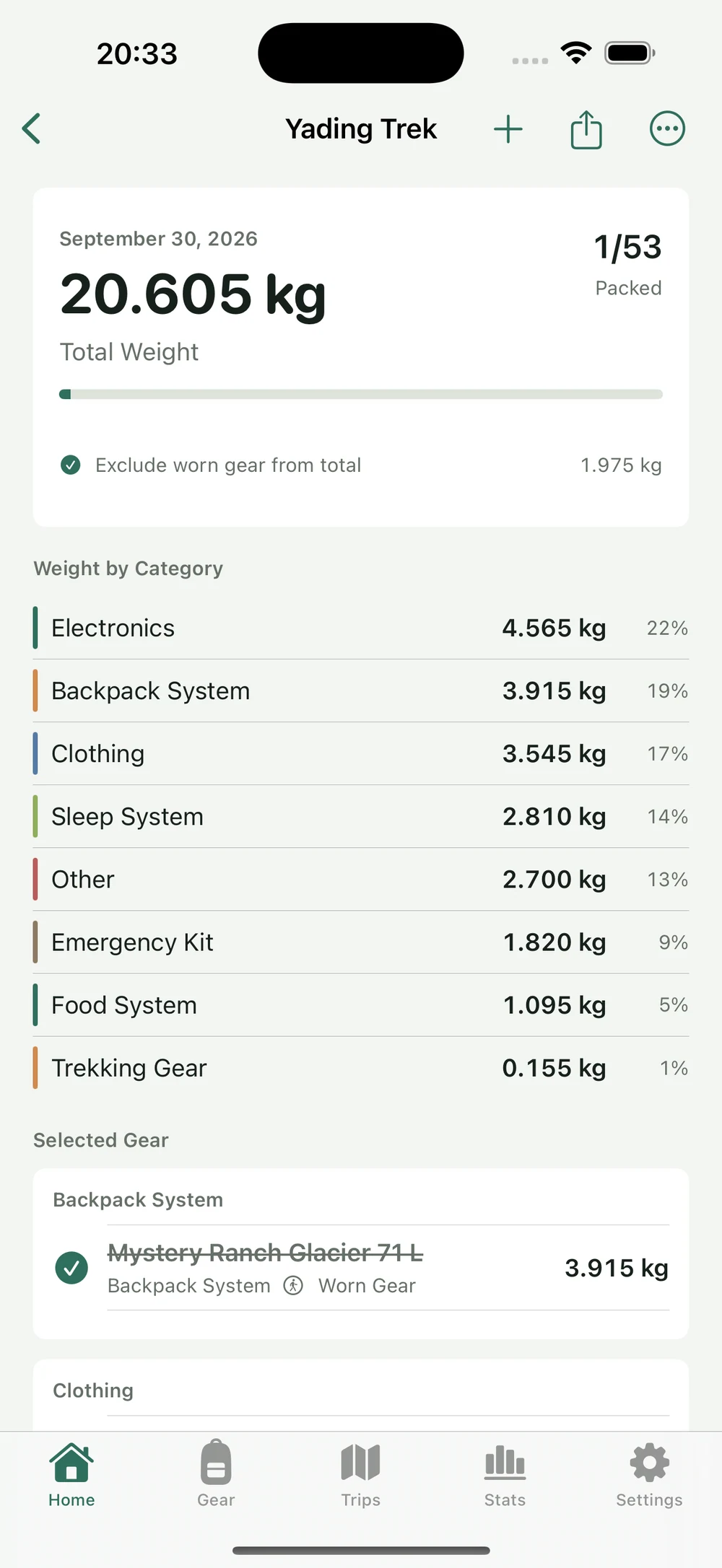
Keep names, categories, weights, photos, and notes in a reusable library. Select gear and carried quantities for each trip, check items as you pack, and review pack and worn weight separately.

  • One library for hiking, camping, and camera gear
  • Trip-specific quantities and g, kg, oz, and lb
  • Checkmarks track packing; selected items still count toward weight
Gear and packing guide →
HikerKit English checklist with 1 of 53 entries packed, pack weight, and worn weight

02 / PACK WEIGHT

Know the weight. See what makes it up.

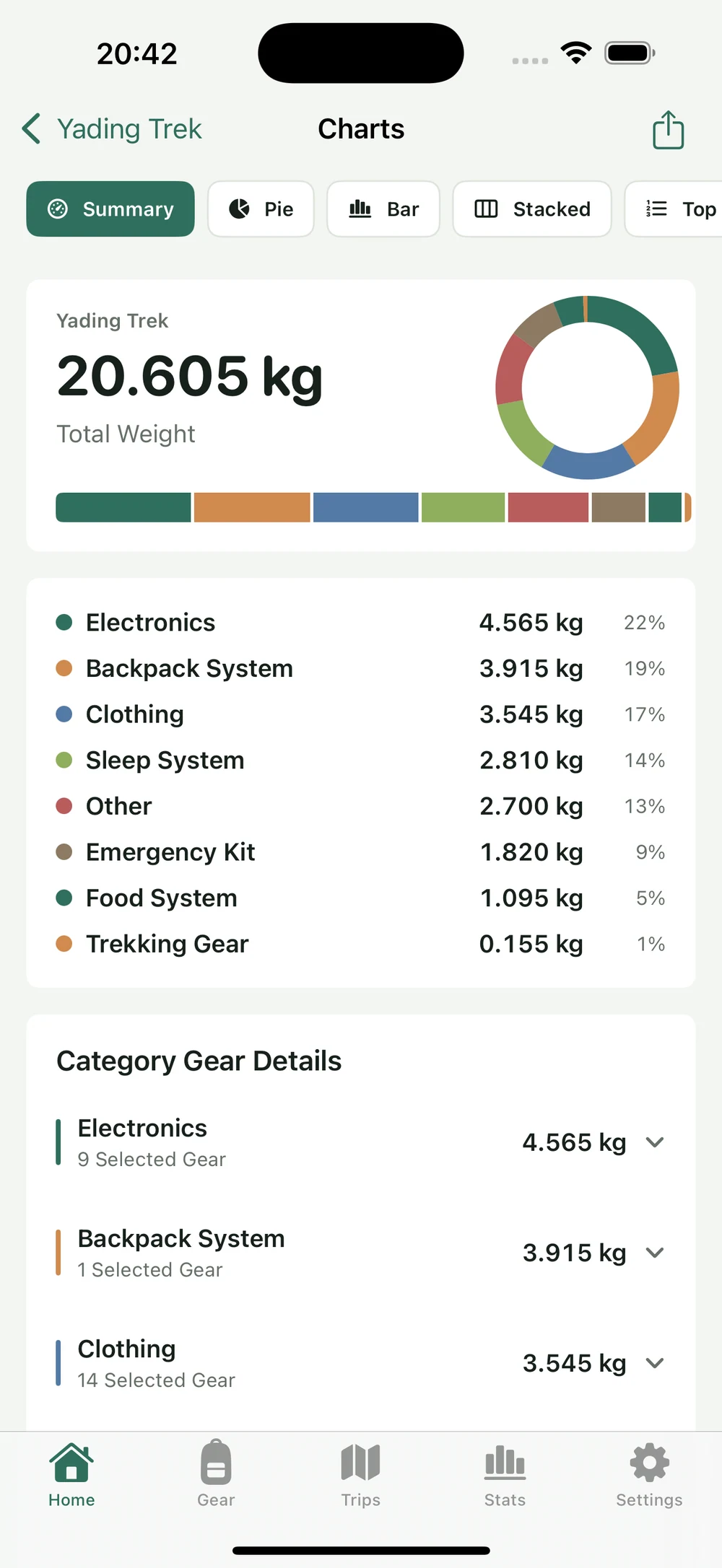
Start with Summary, compare category weights in Bar, read proportions in Stacked, and inspect heavier entries in Top 10. Check cameras, batteries, shelter, and supplies in the same configuration.

  • Summary, Bar, Stacked, and Top 10
  • Expand category details to check individual items
  • Pack weight includes listed supplies and differs from base weight
Pack weight guide →
HikerKit English Charts Summary with total weight and category breakdown

03 / GPX & MEMORY CARDS

A route, a photo, a trip worth keeping.

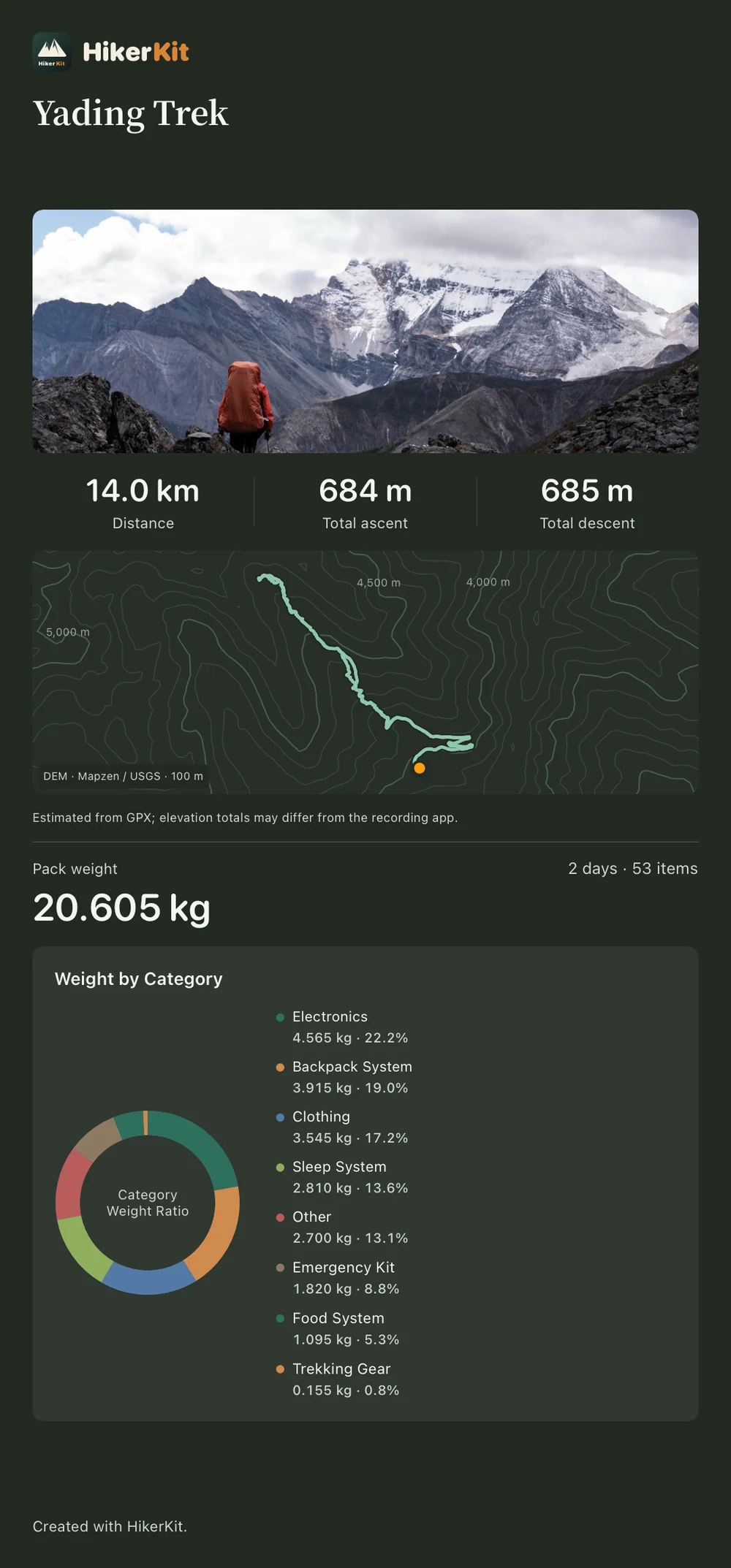
Import one or multiple GPX tracks and review the route, distance, ascent, and descent. Complete the trip with its actual dates, cover photo, memory text, and gear snapshot, then bring them together in a memory card.

  • Separate GPX segments remain separate for review
  • Route-only, contour, terrain, and satellite backgrounds
  • Completion preserves gear; later library edits do not rewrite history
GPX and memory card guide →
Actual HikerKit English dark memory card with a photo, contour route map, and pack weight

04 / HIKING MEMORIES

Find it by date. Remember it by photo.

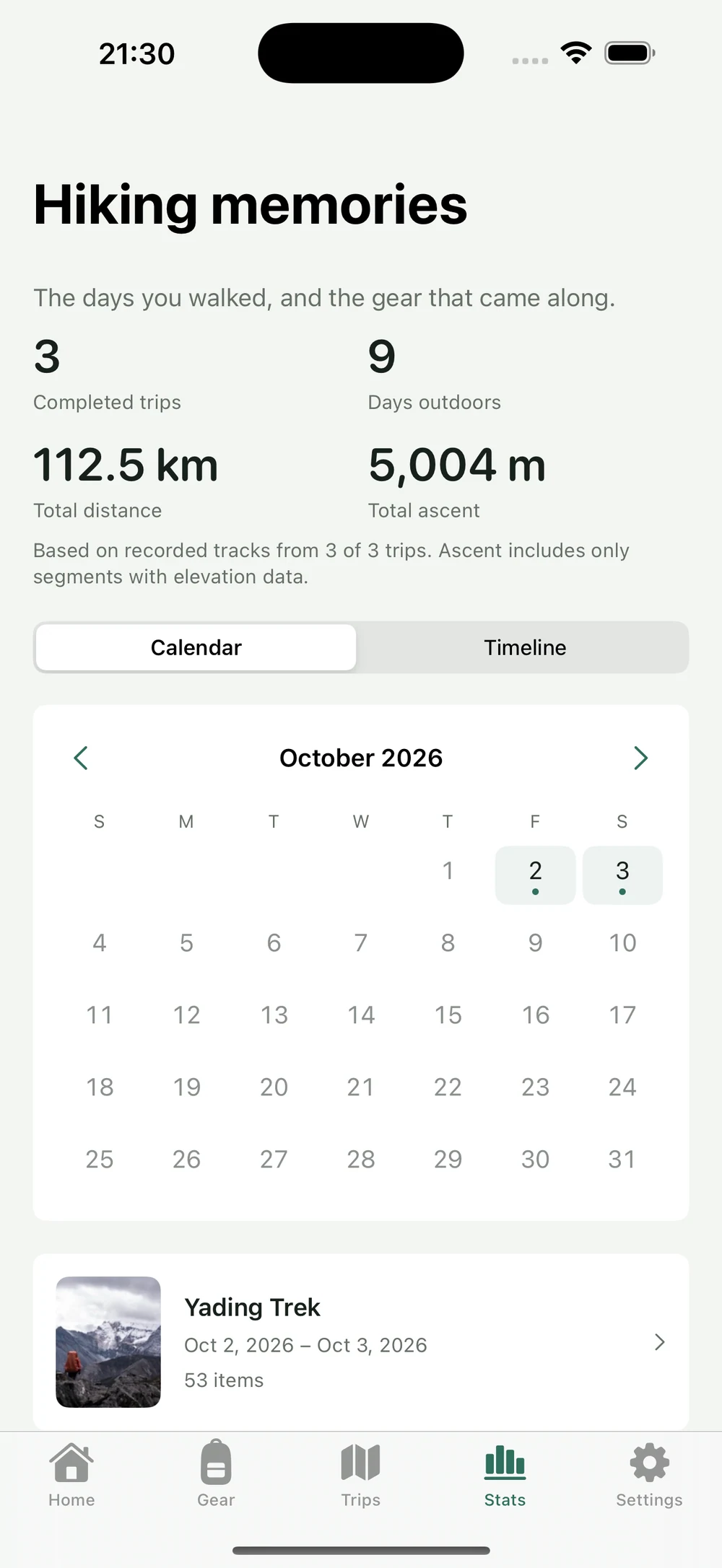
Calendar places completed trips on their actual dates. Timeline brings together completed trips with cover photos. Open either view to revisit the same outing's photo, track, and historical gear.

  • Calendar and cover-photo Timeline open Trip memory
  • Hiking days count distinct dates
  • Distance uses valid GPX; ascent uses segments with elevation
Calendar and Timeline guide →
HikerKit English hiking calendar with completed trips and the Yading Trek record

05 / CONFIGURATION SHARING

A gear setup, made clear enough to share.

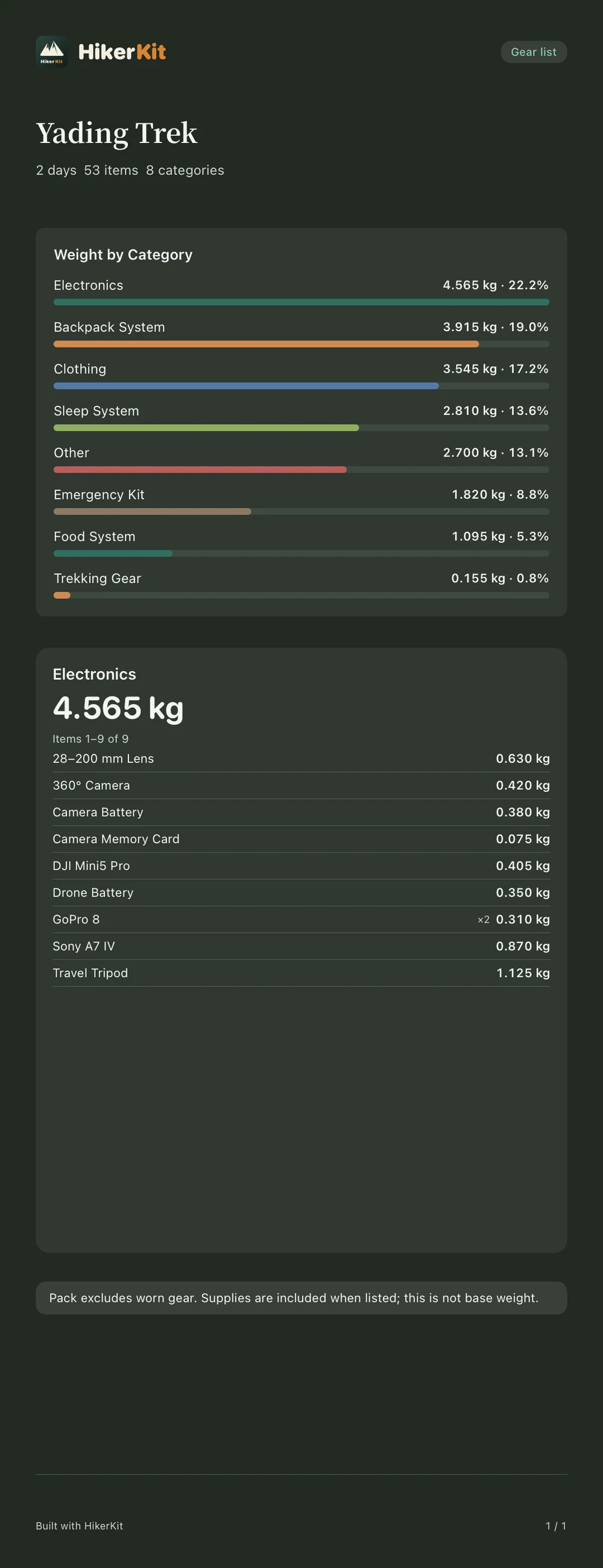
Use a pack profile to explain weight distribution, or a category gear list to check individual items. Choose the chart, pages or a long image, and independent light or dark image colors, then save to Photos or open the system share sheet.

  • Pie, bar, and stacked charts
  • Pack profiles and lists covering selected categories
  • Export colors are independent; settings and images save separately
Chart and gear list sharing guide →
Actual HikerKit English dark Electronics gear-list export with category weights and 9 selected entries

06 / BACKUP & REUSE

Keep a backup of the records you build.

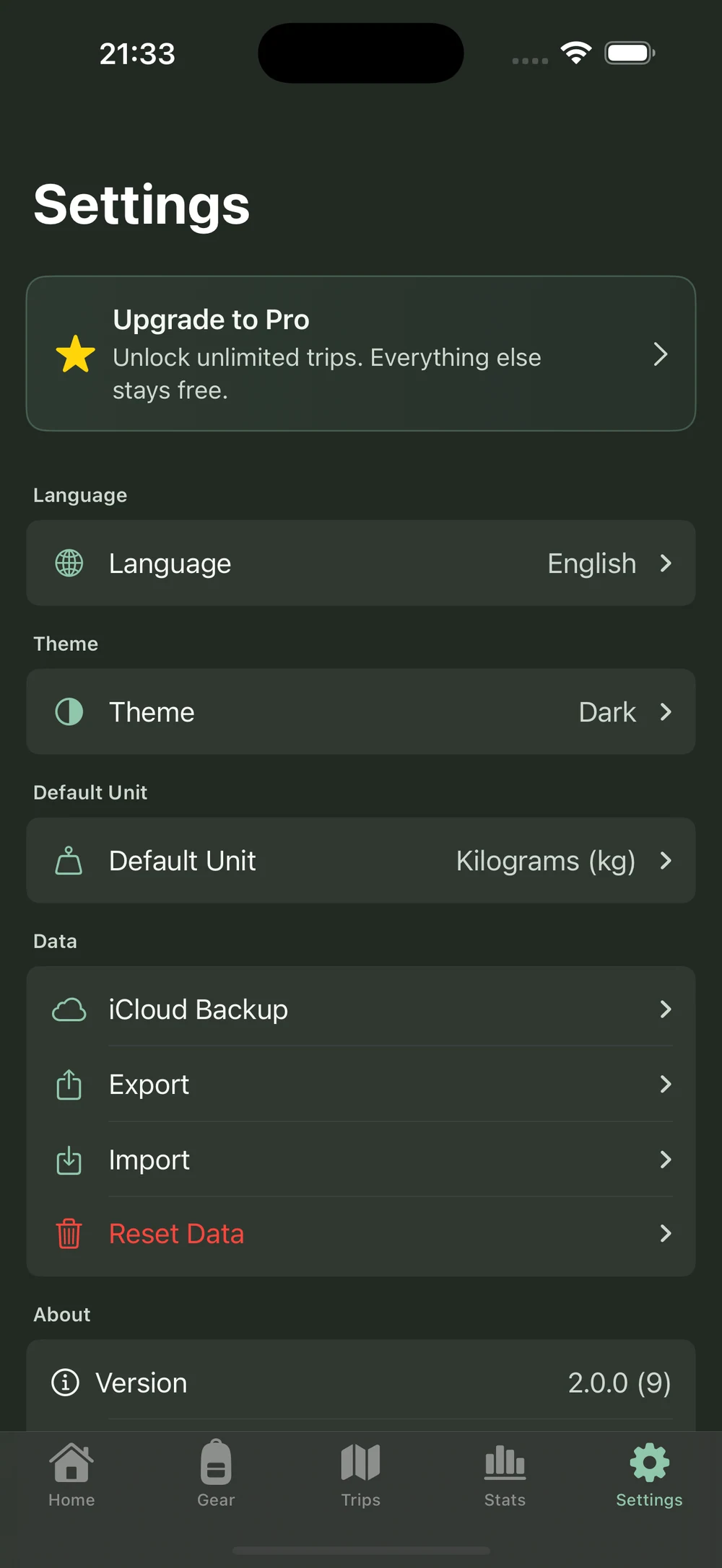
Choose optional iCloud backup, inspect a backup record and its restore preview, then restore explicitly. JSON can export your full records; CSV suits an equipment table. Automatic backup is off by default and runs under its stated conditions after you enable it.

  • iCloud uses a backup-and-restore workflow
  • JSON can include gear, trips, photos, memories, GPX, and sharing settings
  • Use JSON or a backup for full restoration; CSV is a gear table
Backup details and the full workflow →
HikerKit English Settings with optional iCloud Backup and manual Export and Import controls

FREE / PRO

Start free. Choose Pro when you need more trips.

The free version allows up to two trips. Gear, charts, statistics, sharing, backups, import/export, themes, and languages remain available. HikerKit Pro unlocks unlimited trips only.

A few things before you start.

Does HikerKit provide live navigation or track recording?

GPX is for importing recorded tracks and reviewing trips. It does not provide live navigation, turn-by-turn guidance, or automatic recording. Map loading depends on network access, services, and available caches.

Does iCloud backup sync devices in real time?

It provides optional backups and explicit restoration rather than live multi-device database sync. Automatic backup starts off. Once enabled, changed data can be backed up while using the app when at least 24 hours have passed since the last automatic backup.

Will library edits change my old trips?

Completion captures a historical gear snapshot. Later edits or deletions in the library do not rewrite a completed trip's names, weights, or quantities.

Can I use it without GPX or a photo?

Yes. Photos, memory text, and GPX are optional, and packing works on its own. A trip without a valid track cannot automatically gain distance or ascent statistics.

HIKERKIT / iPHONE

Prepare the next outing. Remember this one.

Start with the equipment you use most, pack one checklist, and keep a memory of the trip.

  • Gear, pack weight, and hiking memories on iPhone
  • Up to two trips free; Pro unlocks unlimited trips
  • g, kg, oz, lb, and English and Chinese interfaces
Download on the App Store Read the 2.0 guide